PDF app for Mac and Windows

Bonito PDF

Edit, sign, redact and convert PDFs for a quarter of Acrobat Pro’s US price. First month free.2

Bonito PDF views, organizes, edits, converts and signs PDF files on your Mac or PC. It runs on our own PDF engine, written in Rust, and does all of its work on your computer: nothing is uploaded and nothing is tracked.

Coming soon to the Mac App Store and Microsoft Store

Get notified at launch

Planned US prices: US$7.49 a month or US$58.99 a year, 75% less than Acrobat Pro’s US prices.1 In other countries, the stores set the price at launch.

For Mac and Windows Our own PDF engine, written in Rust Files stay on your computer No uploads, no tracking In Japanese, English, French, Spanish and Korean Fast with documents of thousands of pages

Concept

One window for your everyday PDF work.

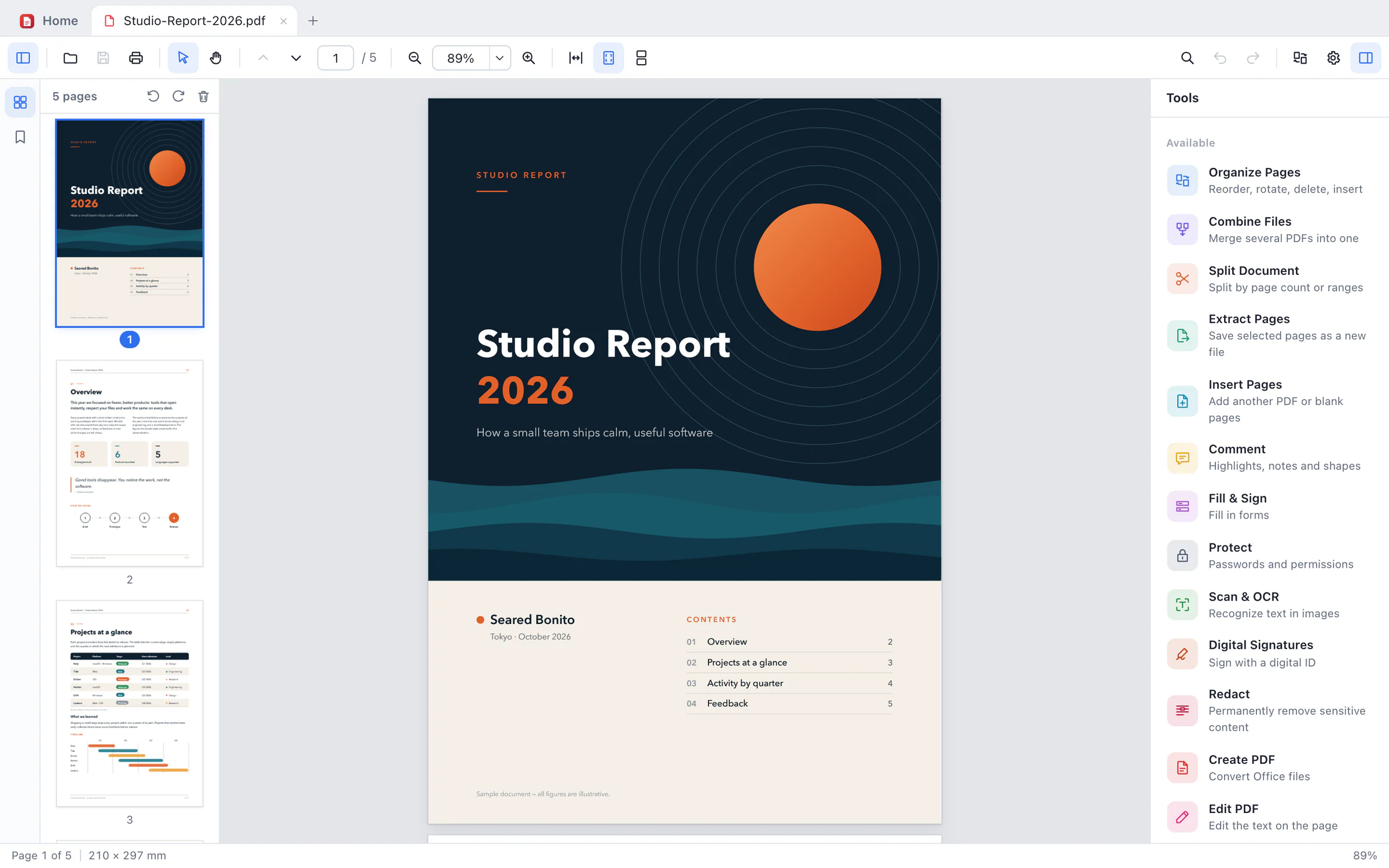
Read and search, comment, fill in, edit text, sign, redact, organize pages and convert, in one desktop app. The Tools panel sits beside the page, so the document stays in view, and on your computer.

The Bonito PDF window: a five-page sample report, Studio Report 2026, open at its cover, with page thumbnails on the left and the Tools panel on the right listing Organize Pages, Combine Files, Split Document, Extract Pages, Insert Pages, Comment, Fill & Sign, Protect, Scan & OCR, Digital Signatures, Redact, Create PDF and Edit PDF.
The same window in

Edit PDF

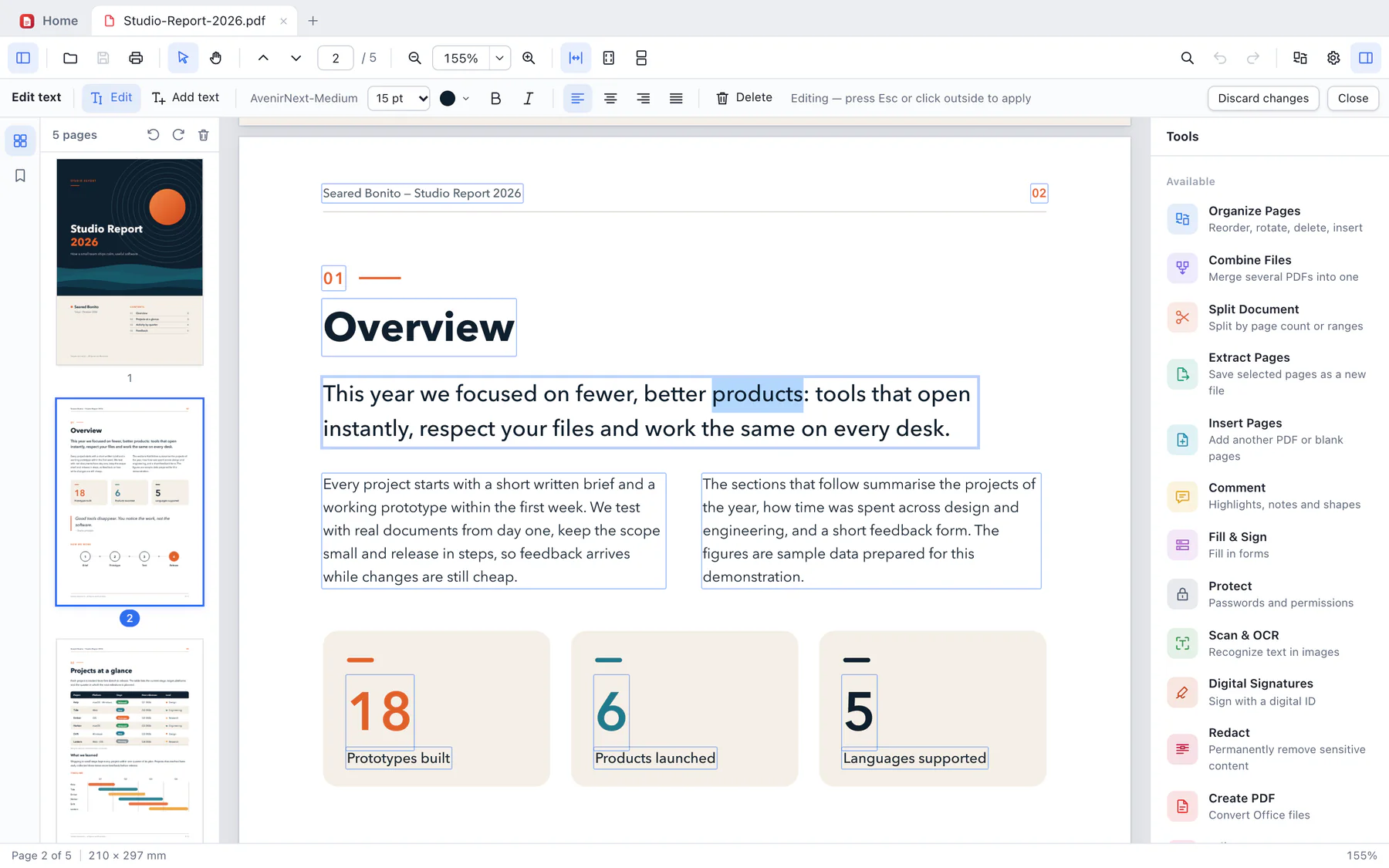
Edit text right on the page.

Click a block of text and type. Bonito PDF keeps the original font, size and colour whenever it can, and tells you when it can’t. The rest of the page stays exactly as it was.

  • Size, colour, bold, italic and alignment
  • Add new text boxes, or delete a block
  • Works with input methods, Japanese and Korean included
Editing text in Bonito PDF: the lead paragraph of page 2 is open for editing with the word “products” selected, and the strip above the page shows the font, AvenirNext-Medium at 15 pt, with colour, bold, italic and alignment buttons.

Comment

Mark it up, then talk it through.

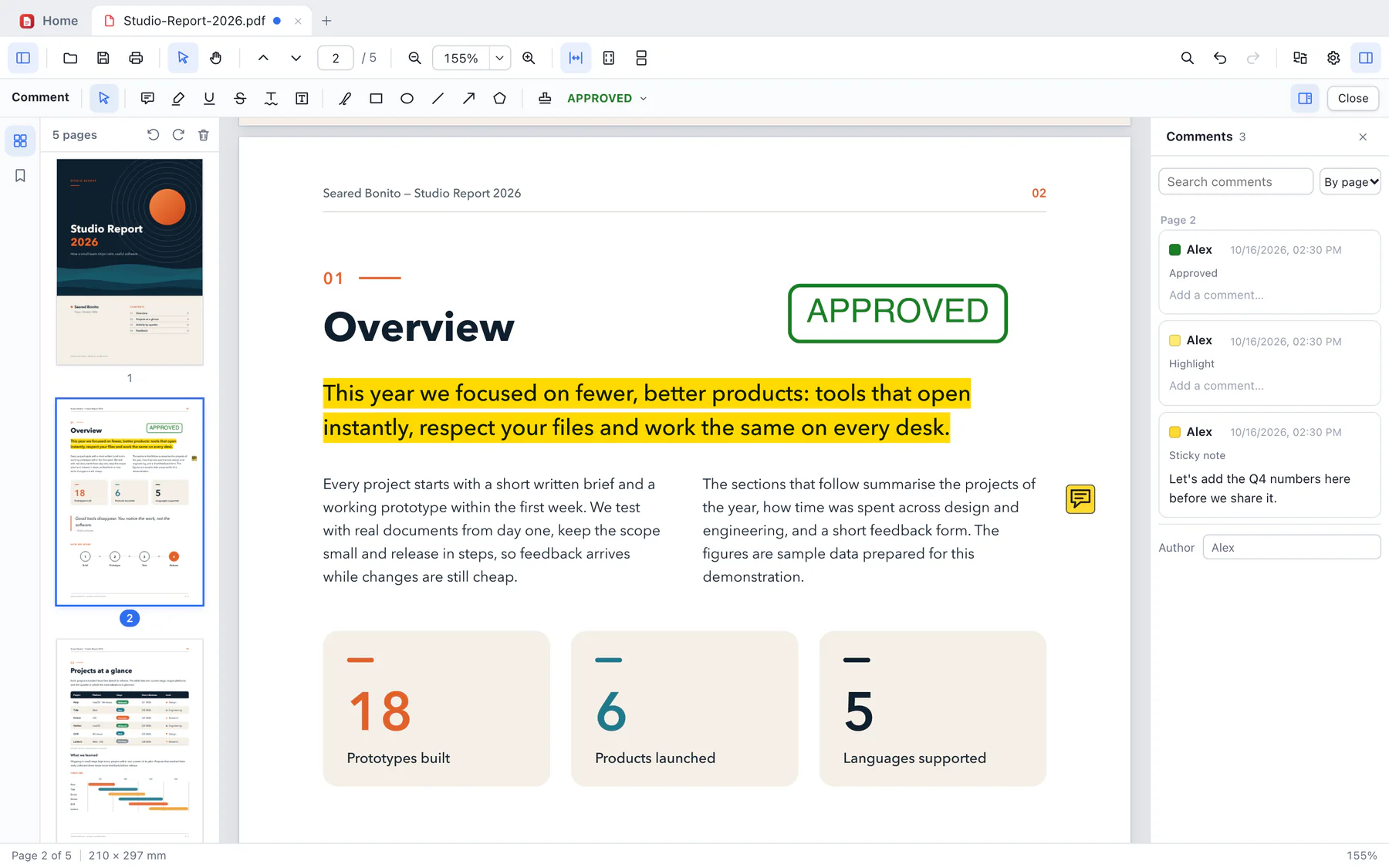
Highlight, underline and strike out text, and add sticky notes, text boxes, shapes, drawings and stamps. Every comment appears in one list, with replies, the author’s name and search.

  • Highlights, notes, text boxes, shapes, drawing
  • Stamps in Japanese, English, French, Spanish and Korean
  • One list, with replies, search and sorting by page or date
Comments in Bonito PDF: the lead paragraph highlighted in yellow, an APPROVED stamp beside the heading and a sticky note in the margin, with the Comments list on the right showing three comments by Alex.

Print

Print exactly the pages you need.

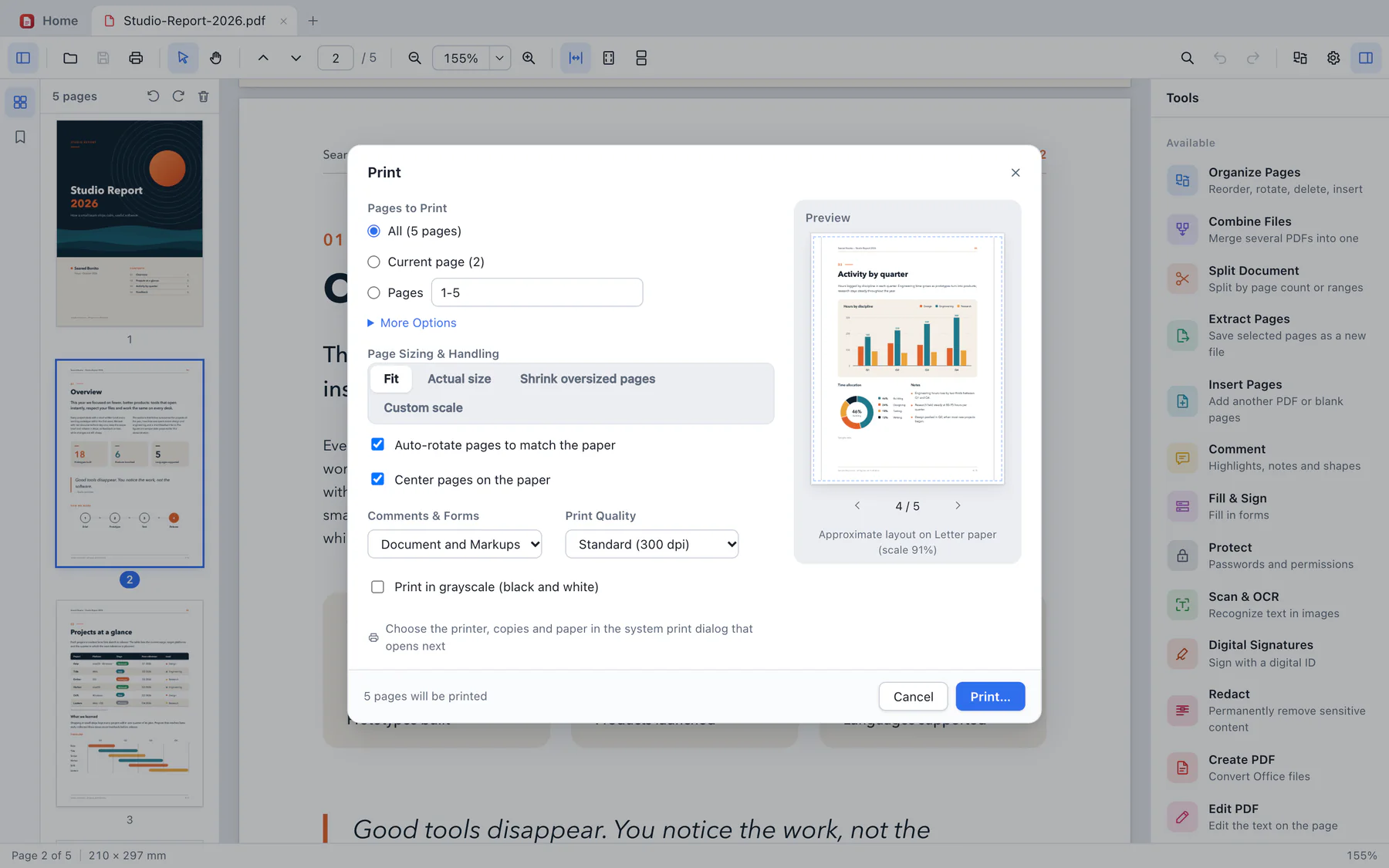
Choose pages, ranges, or odd and even pages, fit them to the paper or print at actual size, and check the preview before your system’s print dialog opens.

  • All, current or selected pages, ranges, odd or even, reverse order
  • Fit, actual size, shrink oversized pages or a custom scale
  • Grayscale, and 150, 300 or 600 dpi
The Print dialog in Bonito PDF: pages to print, page sizing and handling with Fit selected, comments and forms, print quality at 300 dpi and a grayscale option, beside a preview of page 4 of 5 on Letter paper.

Tools

Every tool, by its name in the app.

Fifteen working tools sit in the Tools panel beside the page, and Print is in the toolbar.

Organize

  • Organize Pages

    Rotate, reorder, delete and insert pages, with drag and drop

  • Combine Files

    Merge several PDFs into one, in the order you choose

  • Split Document

    By number of pages, by page ranges, or before the pages you pick

  • Extract Pages

    Save the pages you select as a new file

  • Insert Pages

    Add pages from another PDF, or blank pages

Review and edit

  • Comment

    Highlights, notes, shapes, drawing and stamps

  • Fill & Sign

    Fill in PDF forms: text fields, checkboxes, buttons and lists

  • Edit PDF

    Edit the text on the page

  • Print

    Ranges, sizing, grayscale and quality, with a preview

Sign and secure

  • Protect

    Passwords and permissions, with AES-256 encryption

  • Digital Signatures

    Sign with a digital ID, and check existing signatures

  • Redact

    Permanently remove sensitive content

Convert and check

  • Create PDF

    From Word, Excel and PowerPoint files, with Microsoft Office on your computer

  • Export PDF

    To Word, Excel, PowerPoint, HTML, text or images

  • Scan & OCR

    Make scanned pages searchable and selectable

  • Standards

    Check and convert PDF/A, for archiving

Redact

Redaction that removes, not covers.

A black box drawn over text hides it on screen, but the words can still be in the file. When you redact with Bonito PDF and save, the text, image pixels, drawings and comments inside each area are removed, and the whole file is rewritten.

  • Mark areas or text by hand
  • Find and redact words, e-mail addresses, credit card numbers and more
  • Choose the fill colour and the text shown on top
  • Remove hidden information too, such as metadata
Search the saved file for “alex@example.com”: no results. Illustration

Sign and protect

Sign with your digital ID. Lock what needs locking.

Digital signatures

Sign with a digital ID file (.p12 or .pfx) holding an RSA or ECDSA key. Place a visible signature with your name, the date, a reason and a location, or sign invisibly.

Check signatures

The signature panel shows whether each signature is intact, whether the document changed after signing, and the signer’s certificate details.

Fill in forms

Text fields, checkboxes, radio buttons and lists, with Japanese input too. Reset a form, or flatten it so the answers become part of the page.

Passwords and permissions

Set a password to open the file, a permissions password, or both, and choose what is allowed: printing, copying, editing, commenting and more. AES-256 encryption, and encrypted files stay encrypted when you save.

Convert and check

From PDF to documents you can edit, and back.

Export PDF

Save as Word, Excel, PowerPoint, HTML, plain text or PNG images. Word keeps paragraphs, headings, lists, tables and pictures; Excel puts tables into cells, with numbers stored as numbers. You don’t need Microsoft Office to export.

Create PDF

Turn Word, Excel and PowerPoint files into PDFs, using the Microsoft Office installed on your computer.

Scan & OCR

Add an invisible text layer to scanned pages, so you can search and select their text. Recognition is done on your computer by your operating system: Apple’s Vision framework on a Mac, Windows OCR on a PC. Vertical Japanese is handled on a Mac.

PDF/A for archiving

Check a file against PDF/A-1b, 2b, 2u, 3b and 3u, with each finding linked to its page, and convert to PDF/A-2 or PDF/A-3.

At a glance

15

Working tools in the Tools panel

6

Export formats, from Word to PNG

5

Languages in the app

AES-256

Password protection

Under the hood

Our own PDF engine.

The part of Bonito PDF that reads, draws, edits and writes PDF files is our own code, written in Rust, with no third-party PDF libraries. We decide how every page is drawn and every file is saved.

Fast with big documents

Pages are drawn in tiles, a quick preview first, on several processor cores at once. Documents of thousands of pages open, scroll and search without a struggle.

Conservative output

Files are written with conservative, standards-based PDF 1.7 syntax, and the files the app writes are checked against strict PDF validation in our testing.

Tested on real-world files

Tested against hundreds of real-world PDFs, and fuzz-tested with broken and malformed ones. Some damaged files are repaired as they open.

Fonts, images and colour

Fonts in TrueType, CFF, Type 1 and Type 3; JPEG, JPEG 2000, JBIG2 and CCITT images; ICC colour. General-purpose open-source components, for compression, image decoding and cryptography, are credited in the app.

Privacy

Your documents stay on your computer.

Contracts, invoices, medical forms: the PDFs that matter most are the ones you would rather not upload. Bonito PDF works on them where they are, and sends nothing anywhere.

No uploads

Opening, editing, text recognition, converting and saving all happen on your computer. The app has no function that sends your files anywhere.

No tracking

No analytics, no telemetry, no crash reporting and no ads. Updates come through the app stores.

No Bonito PDF account

There is nothing to sign up for and nothing to sign in to. The subscription goes through your Mac App Store or Microsoft Store account.

Links stay closed

Bonito PDF does not open web links inside a PDF by itself, and it does not run scripts embedded in PDF files.

Bonito PDF vs Acrobat Pro

Side by side with Acrobat Pro.

Much of everyday PDF work can be done in both apps. Features Adobe lists for Acrobat Pro that Bonito PDF lacks are listed here too; this is not a complete list. Acrobat Pro’s features and prices come from Adobe’s US website.

FeatureBonito PDFAcrobat Pro1
In both
View and print PDFsYesYes
Edit text in a PDFYes, keeping the original font when it canYes
Add, delete and organize pagesYesYes
Combine PDFs into oneYesYes
Comment: highlights, sticky notes and moreYesYes
Fill in and sign formsYes, signing with a digital ID fileYes
Export to Word, Excel and PowerPointYes, without Microsoft OfficeYes
Create PDFs from Word, Excel and PowerPoint filesYes, with Microsoft Office installed (still being tested)Yes
Make scans searchable (OCR)Yes, with your operating system’s text recognitionYes
Password-protect PDFsYes, with AES-256Yes
Redact sensitive informationYes: the content is removed from the fileYes
Only in Acrobat Pro
Edit images in a PDFNot availableYes
Create forms and send themNot available; fills in existing formsYes
Request signatures and track responsesNot availableYes
Compare versions of a PDFNot availableYes
Combine different file types into one PDFPDF files onlyYes
Share a link for review and collect feedbackNot availableYes
Mobile and web browserMac and Windows onlyDesktop, mobile and web browser
Cloud storageNone: your files stay on your computer100 GB
Number of tools15, plus Print70+ PDF tools
Price (US, before tax)
Monthly planUS$7.49 a monthUS$29.99 a month
Annual plan, paid up frontUS$58.99 a yearUS$239.88 a year

Also not in Bonito PDF: form calculations and other scripts in PDF files (they don’t run); making scanned documents editable (OCR makes their text searchable and selectable only); creating PDFs from images or from files other than Word, Excel and PowerPoint; time-stamped and long-term validation (LTV) signatures; a list of trusted certificates; and XFA forms. Bonito PDF’s prices are planned prices.

1. Acrobat Pro: the features are from the “Compare plans” list on Adobe’s Acrobat plans and pricing page and from Adobe’s Acrobat Pro page; the prices are Adobe’s US prices for one person, before tax, for the Monthly plan and the Annual, prepaid plan (the annual plan billed monthly is not compared). Read on 16 October 2026. Sources: Adobe Acrobat plans and pricing, Adobe Acrobat Pro. Adobe and Acrobat are trademarks of Adobe Inc. Bonito PDF is not affiliated with Adobe.

Pricing

A quarter of Acrobat Pro’s US price.

Two plans, each at a quarter or less of Acrobat Pro’s US price for the same billing period. New subscribers get the first month free on either.

Monthly

Billed every month

US$7.49 / month

US$89.88 over 12 months

First month free for new subscribers, then US$7.49 a month

Acrobat Pro, Monthly plan (US)
US$29.99 / month
Difference from Acrobat Pro
US$22.50 less a month (75%)
  • Every tool in Bonito PDF
  • Renews every month; cancel any time to stop the next renewal

Annual

Paid once a year

US$58.99 / year

About US$4.92 a month, paid yearly

First month free for new subscribers, then US$58.99 a year

Acrobat Pro, Annual, prepaid (US)
US$239.88 / year
Difference from Acrobat Pro
US$180.89 less a year (75%)
  • Every tool in Bonito PDF
  • US$30.89 less than 12 months of the monthly plan
  • Renews every year; cancelling stops the next renewal, and refunds follow the store’s policy

2. The free month: for new subscribers, one per store account. When it ends, the plan starts automatically at US$7.49 a month or US$58.99 a year and renews until you cancel. To avoid being charged, cancel in your Mac App Store or Microsoft Store account before the free month ends; cancelling stops the next renewal, and refunds follow the store’s policy.

Prices are in US dollars: the planned prices for the United States, before tax. In other countries, the Mac App Store and the Microsoft Store set the price in your currency at launch, and the store shows the final price before you subscribe. “A quarter of the price” compares US prices; against Acrobat Pro’s price in your country, the ratio may differ. A subscription works with the app from the store it was bought in, so using both a Mac and a PC takes two. Payment is handled by Apple or Microsoft. Acrobat Pro prices are Adobe’s US prices before tax, read on 16 October 2026 (see note 1).

Mac
Mac App Store, coming soon
Windows
Microsoft Store, coming soon
Payment
Through Apple or Microsoft
Cancel
Any time, in your store account; the next renewal stops

Get notified at launch

We’ll email you when Bonito PDF is available.

Supported environment

Requirements and specifications

Mac

macOS 11 Big Sur or later

Apple silicon and Intel, in one universal app

Windows

Windows 10 or Windows 11, 64-bit (x64)

Uses the Microsoft Edge WebView2 Runtime

Languages

Japanese, English, French, Spanish and Korean

Follows your system language on first launch; you can change it in Settings

Viewing

Page thumbnails, bookmarks and page labels; several documents in tabs

Single page or continuous scrolling; fit width, fit page, actual size

Find with match case and a full list of results, Japanese included

Light, dark or system theme; undo and redo

Pages

Rotate, reorder, delete, insert and extract pages

Combine files; split by page count, by ranges or before selected pages

Editing and comments

Edit text in place: size, colour, bold, italic, alignment

Highlight, underline, strikeout, squiggly underline, notes, text boxes, freehand drawing, rectangles, ovals, lines, arrows, polygons and stamps

Fill in AcroForm forms; reset or flatten them

Signatures

Digital ID files (.p12 / .pfx) with RSA or ECDSA (P-256, P-384) keys

PAdES B-B (CAdES detached), SHA-256; visible or invisible

Checks existing signatures and changes made after signing

Security

Open and permissions passwords: AES-256, AES-128 or RC4 128-bit

Opens password-protected PDFs (RC4 and AES)

Redaction with true removal, and removal of hidden information

Text recognition

Mac: Apple’s Vision framework (Japanese and Korean need macOS 13 or later)

Windows: Windows OCR (install each language in Windows Settings)

Japanese, English, French, Spanish and Korean

Conversion

Export to Word (.docx), Excel (.xlsx), PowerPoint (.pptx), HTML, text and PNG, without Microsoft Office

Create PDF from Word, Excel and PowerPoint files, with Microsoft Office installed (still being tested with the store versions)

PDF/A: check 1b, 2b, 2u, 3b and 3u; convert to 2b, 2u, 3b and 3u

Printing

Pages, ranges, odd or even, reverse order; fit, actual size, shrink, custom scale

Grayscale; 150, 300 or 600 dpi; preview

Privacy

Files are processed on your computer and never uploaded

No analytics, telemetry, crash reporting or ads; no Bonito PDF account

Not included

Creating form fields; XFA forms

Editing images and other page objects

Time-stamped and long-term validation signatures; a list of trusted certificates

Price

Monthly US$7.49 or annual US$58.99 (planned US prices, before tax)

First month free for new subscribers on both plans; then the plan renews until you cancel

Other countries: the store sets the local price at launch and shows the final price

Availability

Coming soon to the Mac App Store and Microsoft Store

Questions

Frequently asked

Bonito PDF is not on sale yet. It is coming soon to the Mac App Store and the Microsoft Store. Leave your email in the form on this page and we will tell you when it is available.
Two plans, both with the first month free for new subscribers: US$7.49 a month, or US$58.99 a year paid up front (about US$4.92 a month). These are the planned US prices, a quarter or less of Acrobat Pro’s US prices for the same billing period: US$29.99 a month and US$239.88 a year, before tax, on Adobe’s website on 16 October 2026. In other countries, the Mac App Store and the Microsoft Store set the price in your currency at launch, and the store shows the final price before you subscribe. “A quarter of the price” compares US prices; against Acrobat Pro’s price in your country, the ratio may differ. The subscription renews automatically until you cancel it in your store account.
Yes. Both plans start with the first month free for new subscribers, through the free trial of the Mac App Store or the Microsoft Store, once per store account. When it ends, the plan starts automatically at US$7.49 a month or US$58.99 a year. If you don’t want to continue, cancel in your store account before the free month ends; the store shows the date.
If your work is mostly reading, commenting, filling in and signing forms, editing text, organizing and combining pages, redacting, password protection, OCR and converting to and from Word, Excel and PowerPoint, Bonito PDF has a tool for each. It does not edit images, create forms, run form calculations, request signatures from others, compare versions or share review links; it does not run on phones, tablets or in a web browser; and it has no cloud storage. The comparison on this page lists the differences, and the first month is free, so you can try it with your own files before you change anything.
Yes. PDFs made with Acrobat are standard PDF files, and Bonito PDF opens standard PDF files, password-protected ones included; it can also repair some damaged files as it opens them. The exceptions are XFA forms, which are not supported, and scripts inside a PDF, which don’t run: form fields that calculate totals or check what you type won’t do so in Bonito PDF. The files Bonito PDF saves are written with conservative, standards-based PDF 1.7 syntax and checked against strict PDF validation in our testing.
Bonito PDF fills in standard PDF forms (AcroForm): text fields, checkboxes, radio buttons and lists, and it can reset or flatten them. Calculations, formatting and checks that a form does with scripts don’t run, so totals and other calculated fields are not updated. It does not create new form fields, and XFA forms are not supported, so designing forms is not something it can take over.
Yes. You sign with a digital ID file (.p12 or .pfx), visibly or invisibly; a digital ID kept only in your system’s certificate store has to be exported to such a file first. Bonito PDF also checks existing signatures: whether each one is intact and whether the document changed after signing. It does not keep a list of trusted certificates, so the signer’s identity is shown as not verified; time-stamped and long-term validation signatures are not included; and you can’t request signatures from others or track them.
Yes, with one subscription per person: each person subscribes with their own Mac App Store or Microsoft Store account. There is no team plan, admin console or central billing. For comparison, Adobe lists Acrobat Pro for teams at US$287.88 per licence per year (US, annual, prepaid, before tax, on 16 October 2026); Bonito PDF’s annual plan is US$58.99 per person.
Yes. A subscription is bought in one store and works with the app from that store: the Mac App Store for Mac, the Microsoft Store for Windows. Bonito PDF has no account of its own to link the two, so a Mac and a PC cost twice as much: two annual plans come to US$117.98 a year, about half of Acrobat Pro’s US annual, prepaid price. Adobe says one Acrobat subscription includes its desktop software, online access and mobile apps.
No. Bonito PDF opens, edits, converts and saves your files on your computer, and text recognition runs on your computer too. The app does not send your documents, or anything about how you use it, anywhere.
Not a Bonito PDF account: there is nothing to sign up for and nothing to sign in to. The subscription is bought and managed with your Mac App Store or Microsoft Store account.
Yes. Click a block of text to edit it in place, add new text boxes or delete blocks, and change the size, colour, bold, italic and alignment. Bonito PDF keeps the original font, size and colour whenever it can; when a font is missing, it uses a substitute and tells you which one. Editing images and other objects is not included.
Yes. When you apply redaction and save, the text, image pixels, drawings and comments inside each marked area are removed from the file, not just covered, and the whole file is rewritten. You can also remove hidden information such as metadata.
Not to export. Bonito PDF writes Word, Excel and PowerPoint files itself. To create PDFs from Word, Excel or PowerPoint files, it uses the Microsoft Office installed on your computer; this is still being tested with the Mac App Store and Microsoft Store versions.
Japanese, English, French, Spanish and Korean. On a Mac it uses Apple’s Vision framework, and Japanese and Korean need macOS 13 or later. On Windows it uses Windows OCR, and each language must be installed in Windows Settings.
Mac computers with macOS 11 Big Sur or later, with Apple silicon or Intel, and PCs with 64-bit (x64) Windows 10 or Windows 11. There is no native build for Windows on Arm, Linux, iPhone or iPad.
On our own PDF engine, written in Rust: reading, drawing, text extraction, editing and writing PDF files are our own code, with no third-party PDF libraries. General-purpose open-source components, for things like compression, image decoding and cryptography, are credited in the app.

Get notified

Hear when Bonito PDF is out.

Leave your name and email, and we will tell you when Bonito PDF reaches the Mac App Store and the Microsoft Store. Questions and requests are welcome too.

Please enter your name.

Please enter a valid email address.

For launch news, a message is optional. If you like, tell us whether you use a Mac or a PC.

Please write a message.

We use your address only to reply, and to tell you about the launch if you asked. A launch-notice request is deleted once the notice is sent, and you can withdraw it at any time. See the Studio Privacy Policy for how we handle it.

Or write directly to support@searedbonito.com